
Overview
In the IMAP vs POP3 choice, use IMAP unless you have a specific reason not to. IMAP keeps your mail on the server and syncs every folder, read flag and sent message across your phone, laptop and webmail. POP3 downloads mail to one device and, by default, deletes it from the server, so your other devices never see it and the only copy lives on a single computer.
This comparison is for anyone setting up a business mailbox in Outlook, Apple Mail or a phone and staring at the “IMAP or POP” question. It covers what each protocol actually does with your mail, the cases where POP3 still makes sense, the ports to use, and how to switch an existing POP3 setup to IMAP without losing years of email, which is the part most guides leave out.
Quick comparison
| IMAP | POP3 | |
|---|---|---|
| Where mail lives | On the server; devices keep a synced copy | Downloaded to one device |
| Multiple devices | All see the same mail and folders | Each device gets its own, partial view |
| Sent items and folders | Synced | Stay on the device that created them |
| Read and deleted status | Synced | Not synced |
| Server storage used | All mail, so watch your quota | Little, if mail is removed after download |
| Works offline | Yes, for synced mail | Yes |
| If the computer dies | Mail is still on the server | Mail is gone unless backed up |
| Secure port | 993 (SSL/TLS) | 995 (SSL/TLS) |
How IMAP works
IMAP treats the mail server as the master copy. Your mail app shows a synced view of it: when you file a message into a folder on your phone, it moves on the server, and your laptop shows the change seconds later. Sent mail goes into the server’s Sent folder, so a reply you wrote on your phone is there on your desktop too.
The trade-off is storage. Everything stays on the server, attachments included, until you delete or archive it. On hosting with a mailbox quota, a busy inbox fills up in a year or two, and a full mailbox starts bouncing new mail. Keep an eye on the quota in your control panel and archive old years locally or ask for more space. If mail has stopped arriving, a full mailbox is the first thing the email troubleshooting guide checks.
How POP3 works
POP3 is older and simpler. Your mail app connects, downloads new messages, and usually tells the server to delete them. From then on the only copy is in that app’s local data file. Most apps have an option to leave a copy of messages on the server, which lets a second device also download them, but nothing else syncs: folders, read status and sent items stay on whichever device you used.
When POP3 still makes sense
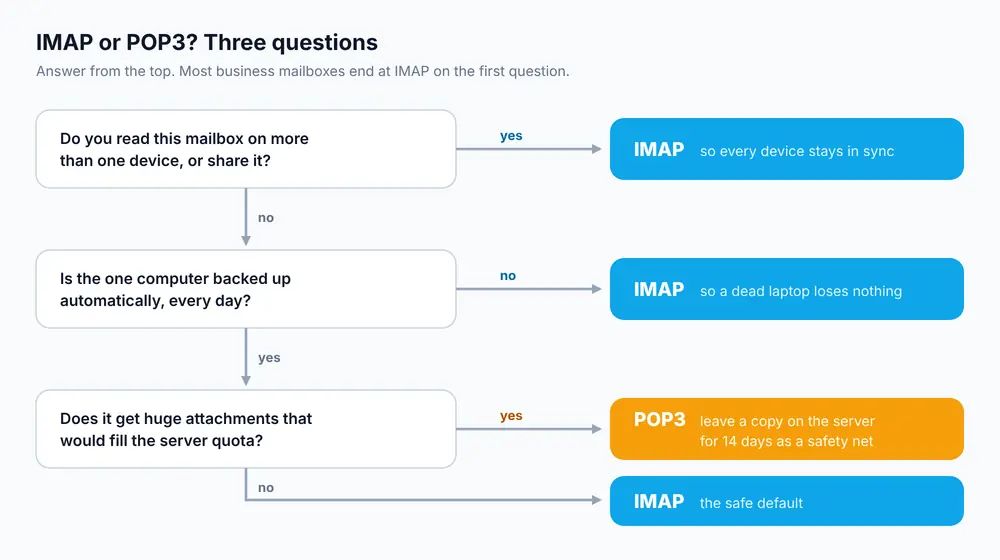
- A single shared front-desk computer that’s the only place the mailbox is ever read, with proper backups.
- A mailbox that receives large attachments (scans, CCTV exports) where keeping them on the server would blow the quota.
- Archiving: a second machine that pulls a copy of everything with “leave on server” turned on, purely as a backup.
If none of these fit, IMAP is the better choice for a business.
Server settings and ports
Always use the encrypted ports. On cPanel hosting, the incoming server is usually mail.yourdomain.com or the server’s hostname; cPanel’s Connect Devices page shows the exact name for your account.
| Protocol | Port | Encryption |
|---|---|---|
| IMAP | 993 | SSL/TLS |
| IMAP | 143 | STARTTLS (only if 993 is blocked) |
| POP3 | 995 | SSL/TLS |
| POP3 | 110 | STARTTLS (only if 995 is blocked) |
| SMTP (sending) | 465 or 587 | SSL/TLS or STARTTLS |
Sending is the same either way; IMAP and POP3 only control how you receive. Step-by-step setup for each app is in setting up cPanel email in Outlook, iPhone and Android. To test whether the server answers on a port from your computer:
openssl s_client -connect mail.yourdomain.com:993 -quietA line starting * OK means IMAP is reachable. Press Ctrl+C to quit. Use port 995 to test POP3, which answers with +OK.
How to switch from POP3 to IMAP without losing mail
You can’t change an existing account from POP3 to IMAP in Outlook or Apple Mail; you add a new IMAP account and move the old mail into it. Because POP3 may have removed mail from the server, the only copy of years of email might be on your computer, so go carefully.
- Back up the local mail first. In Outlook, find the data file under File > Account Settings > Data Files and copy the
.pstsomewhere safe. In Apple Mail, use Mailbox > Export Mailbox. - Check your mailbox quota on the server. Uploading 15 GB of old mail into a 5 GB mailbox will fail halfway.
- Add the same address again as an IMAP account, using port 993 and SSL/TLS.
- Drag folders from the old POP3 account into the new IMAP account. This uploads them to the server. Start with one small folder and check it appears in webmail before moving the rest.
- Remove the POP3 account only once everything shows in webmail. In Outlook, removing the account doesn’t delete the
.pstfile, so you still have the backup. - Set up your other devices with IMAP. They’ll now show the full history.
Troubleshooting
Mail disappears from my phone after my computer checks mail
The computer is set up with POP3 and deletes mail from the server after downloading it. Switch the computer to IMAP, or at least turn on “leave a copy on the server”.
Sent emails don’t appear on my other devices
Either the account is POP3, or an IMAP app is saving sent mail in a local folder. In the app’s account settings, map the Sent folder to the server’s Sent folder.
Mailbox full or “quota exceeded” after switching to IMAP
Your old mail now lives on the server. Delete or archive old messages, empty Trash and Junk, or increase the mailbox quota in cPanel under Email Accounts > Manage. If disk space is fine but the account still complains, you may be hitting the file count limit instead; see reducing inode usage.
Choosing between your host’s email and a hosted suite is a separate question; email hosting vs Gmail for business compares them. Every mailbox on our cPanel hosting plans supports IMAP, POP3 and webmail, and our support team can help move a POP3 archive across.
Frequently Asked Questions
Is IMAP or POP3 better?
For most people IMAP is better, because it keeps mail on the server and syncs folders, read status and sent items across every device. POP3 suits a single computer that is the only place a mailbox is read and is backed up properly.
Does POP3 delete email from the server?
By default most mail apps delete messages from the server after downloading them with POP3. You can turn on an option to leave a copy on the server, but folders and read status still won’t sync.
What ports do IMAP and POP3 use?
IMAP uses 993 with SSL/TLS (or 143 with STARTTLS) and POP3 uses 995 with SSL/TLS (or 110 with STARTTLS). Sending uses SMTP on 465 or 587 for both.
Can I change an account from POP3 to IMAP?
Not in place. Add the address again as a new IMAP account, drag the old folders into it to upload them to the server, check them in webmail, then remove the POP3 account.
Does IMAP use more server storage?
Yes, because all mail stays on the server until you delete or archive it. Watch your mailbox quota and archive old years if it gets close to full.