
Overview
A DMARC record is one TXT record at _dmarc.yourdomain.com that tells Gmail, Outlook and every other receiver what to do with mail that claims to be from your domain but fails SPF and DKIM. Start with v=DMARC1; p=none; rua=mailto:you@yourdomain.com, read the reports for two to four weeks, fix every legitimate sender that fails, then move to p=quarantine and finally p=reject.
This guide is for anyone who runs email on their own domain, whether the mailboxes live on cPanel hosting, Google Workspace or Microsoft 365. Since 2024, Gmail and Yahoo require a DMARC record from anyone sending bulk mail to their users, and Outlook.com followed in 2025, so even small businesses that only send invoices and newsletters are now affected. By the end you’ll have a working record, know how to read the reports it produces, and know when it’s safe to tighten the policy.
Prerequisites
- Access to the DNS zone for your domain (cPanel Zone Editor, Plesk DNS Settings, or your registrar or DNS provider).
- A working SPF record. If you don’t have one yet, follow how to create an SPF record first.
- DKIM signing turned on for every service that sends as your domain. On cPanel this is under Email > Email Deliverability.
- A mailbox to receive reports. A dedicated address such as
dmarc@yourdomain.comkeeps the daily XML files out of your main inbox.
How DMARC decides whether a message passes
This is the part most guides skip, and it is why people turn on p=reject and then lose their own invoices. A message passes DMARC when SPF or DKIM passes and is aligned with the domain in the visible From address. Passing alone isn’t enough.
- SPF alignment: SPF checks the hidden envelope sender (the Return-Path), not the From address you see. When a newsletter service sends with its own bounce domain, SPF passes for their domain and is not aligned with yours.
- DKIM alignment: the
d=domain in the DKIM signature must match your From domain. Many services sign with their own domain until you set up custom DKIM for yours.
By default alignment is relaxed, so mail.yourdomain.com counts as aligned with yourdomain.com. In practice, DKIM signed with your own domain is the one that saves you, because it survives forwarding and SPF doesn’t.
Step 1: Create the DMARC record with p=none
Add a TXT record with these values. In cPanel, open Domains > Zone Editor, click Manage next to the domain, then Add Record > Add TXT Record.
| Field | Value |
|---|---|
| Type | TXT |
| Name / Host | _dmarc (some panels want _dmarc.yourdomain.com.) |
| TTL | 3600 |
| Value | see below |
v=DMARC1; p=none; rua=mailto:dmarc@yourdomain.com; fo=1What each tag does:
| Tag | Meaning | Recommended |
|---|---|---|
p |
Policy for your domain: none, quarantine or reject |
Start at none |
rua |
Where daily aggregate reports go | Always set it |
sp |
Policy for subdomains (defaults to p) |
Set only if subdomains differ |
adkim / aspf |
Alignment: r relaxed (default) or s strict |
Leave relaxed |
pct |
Percentage of failing mail the policy applies to | Optional while ramping up |
fo |
When failure reports are generated; 1 means any failure |
Harmless; few receivers send them |
A domain must have exactly one DMARC record. Two records at _dmarc is treated by receivers as having none at all.
Step 2: Check the record is live
From a Linux or Mac terminal:
dig +short TXT _dmarc.yourdomain.comOn Windows, in Command Prompt or PowerShell:
nslookup -type=TXT _dmarc.yourdomain.comYou should see your record exactly once, starting with v=DMARC1. If nothing comes back, wait for the TTL to pass and check you edited the zone your domain actually uses: dig +short NS yourdomain.com shows which DNS servers are authoritative. If they aren’t your host’s, the record belongs at that other provider. Our guide on diagnosing DNS issues covers this in more detail.
Step 3: Read the aggregate reports
Within a day or two, Google, Microsoft, Yahoo and others start sending a zipped or gzipped XML file to your rua address every 24 hours. Each one lists the IP addresses that sent mail as your domain, how many messages, and whether SPF and DKIM passed and aligned.
You can upload them to a DMARC report analyser, but a short script gives you the same answer without handing your mail data to anyone. Save the attachments into one folder and run this with Python 3:
import glob, gzip, zipfile
import xml.etree.ElementTree as ET

def load(path):
    if path.endswith(".zip"):
        with zipfile.ZipFile(path) as z:
            return z.read(z.namelist()[0])
    if path.endswith(".gz"):
        return gzip.open(path).read()
    return open(path, "rb").read()

for f in sorted(glob.glob("*.zip") + glob.glob("*.gz") + glob.glob("*.xml")):
    root = ET.fromstring(load(f))
    org = root.findtext("report_metadata/org_name")
    for rec in root.iter("record"):
        ip = rec.findtext("row/source_ip")
        count = rec.findtext("row/count")
        dkim = rec.findtext("row/policy_evaluated/dkim")
        spf = rec.findtext("row/policy_evaluated/spf")
        print(f"{org:<20} {ip:<40} {count:>5}  dkim={dkim:<5} spf={spf}")
Every line where both dkim and spf say fail is mail that would be blocked under p=reject. For each failing IP, run dig -x on it or look it up to see who owns it, then sort it into one of three groups:
- Your own server or mail provider failing: SPF or DKIM is misconfigured. Fix the record or turn on DKIM.
- A service you use (newsletter tool, CRM, helpdesk, accounting software, WHMCS sending through an outside SMTP relay): set up that service’s custom DKIM for your domain and add it to SPF.
- Nobody you recognise: that’s spoofing, and exactly what DMARC exists to block. Leave it failing.
Step 4: Move to quarantine, then reject
Once a full week of reports shows only spoofed sources failing, tighten the policy. The rollout below is the one we use with customers; it moves only when the reports say it’s safe.
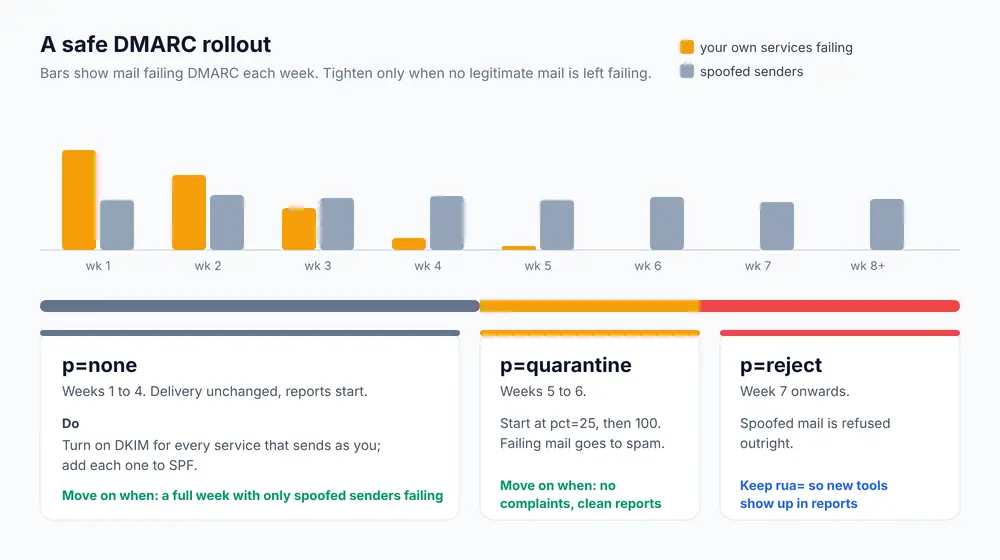
v=DMARC1; p=quarantine; pct=25; rua=mailto:dmarc@yourdomain.comAfter another week with no surprises, raise pct to 100, and then switch to:
v=DMARC1; p=reject; rua=mailto:dmarc@yourdomain.comKeep rua in the record forever. New tools get added to a business all the time, and the reports are how you notice the new CRM sending unsigned mail before your customers stop receiving it.
Domains that never send email
Parked domains and brand-protection domains are favourite spoofing targets because nobody watches them. Lock them down straight away; there’s no legitimate mail to break:
_dmarc.parked-domain.com.   TXT   "v=DMARC1; p=reject;"
parked-domain.com.          TXT   "v=spf1 -all"
Troubleshooting
550-5.7.26 Unauthenticated email from yourdomain.com is not accepted due to domain’s DMARC policy
Gmail rejected a message because it failed both aligned SPF and aligned DKIM while your policy is reject (or quarantine). Find the sending source in the bounce headers, then fix DKIM for that source. If it’s urgent, drop back to p=none while you fix it; receivers pick up the change once the TTL expires.
No reports are arriving
Check the record has a rua=mailto: address with no typos, that the mailbox isn’t full, and that you’ve waited at least 48 hours. Reports only arrive from receivers you actually sent mail to, so a quiet domain gets few. If rua points at a different domain from the one the record is on, that other domain must publish an authorisation record, otherwise receivers won’t send to it:
yourdomain.com._report._dmarc.reportsdomain.com. TXT "v=DMARC1"SPF passes but DMARC still fails
SPF passed for the service’s own bounce domain, not yours, so it isn’t aligned. Set up custom DKIM for your domain in that service. DKIM alignment is the reliable fix; trying to force SPF alignment usually isn’t possible with third-party senders.
Forwarded or mailing-list mail fails DMARC
Forwarding changes the sending server, so SPF fails, and mailing lists that edit the subject or add a footer break DKIM. Large receivers handle common forwarding with ARC, but some loss is expected under p=reject. This is normal and not a sign your setup is wrong. If your own staff forward mail from a cPanel mailbox, the email forwarding guide explains how to keep it reliable.
Mail suddenly lands in spam after adding DMARC
p=none doesn’t change delivery, so a drop after adding it usually has another cause: a listed IP, a missing PTR record or content. Work through preventing spam folder delivery and blacklisting and the cPanel email troubleshooting guide.
If you manage the server yourself, configuring SPF, DKIM and DMARC in WHM covers the server-wide settings. On our cPanel hosting plans, DKIM is on by default, and our support team can check your reports with you before you move to p=reject.
Frequently Asked Questions
What is a good DMARC record to start with?
Start with v=DMARC1; p=none; rua=mailto:dmarc@yourdomain.com. It changes nothing about delivery but starts the daily reports, which show every server sending mail as your domain and whether it passes.
Does DMARC require both SPF and DKIM?
No. A message passes DMARC if either SPF or DKIM passes and is aligned with the From domain. Set up both anyway, because SPF breaks when mail is forwarded and DKIM usually survives.
How long should I stay on p=none?
Long enough to see every service that sends as your domain, which is usually two to four weeks. Move on when a full week of reports shows only unknown, spoofed sources failing.
Is DMARC required by Gmail and Outlook?
Gmail and Yahoo have required a DMARC record from bulk senders (around 5,000 messages a day to their users) since 2024, and Outlook.com added the same rule in 2025. A p=none policy meets the requirement, but smaller senders benefit too because DMARC improves trust in your domain.
Can I have more than one DMARC record?
No. If two TXT records exist at _dmarc, receivers treat the domain as having no DMARC policy. Combine everything into a single record.