
Overview
ERR_TOO_MANY_REDIRECTS means two redirect rules disagree, so the browser bounces between the same two addresses until it gives up (Chrome and Firefox stop after 20 hops). On a site behind Cloudflare, the cause is almost always the SSL mode set to Flexible while your server also forces HTTPS. Without Cloudflare, it is usually WordPress set to one address while a server rule sends visitors to another.
This guide is for site owners on cPanel or Plesk hosting who suddenly can’t open their own site, often right after installing SSL, turning on Cloudflare or switching between www and non-www. You’ll trace the loop with one command, see which two rules are fighting, and leave each redirect in one place only so it doesn’t come back.
The wording depends on the browser, but it’s the same fault:
- Chrome and Edge: “This page isn’t working. example.com redirected you too many times.” with the code ERR_TOO_MANY_REDIRECTS.
- Firefox: “The page isn’t redirecting properly.”
- Safari: “Too many redirects occurred trying to open” followed by the address.
What causes ERR_TOO_MANY_REDIRECTS
Every redirect loop is two layers giving opposite answers. These are the pairs I see on hosting servers, most common first:
| Cause | What the trace shows | Where to fix it |
|---|---|---|
| Cloudflare Flexible SSL plus a server HTTPS redirect | The same https address redirects to itself | Cloudflare SSL/TLS mode |
| WordPress URL on http while the server forces https | http and https swap back and forth | WordPress settings or wp-config.php |
| www forced in one place, non-www in another | www and non-www swap back and forth | Plesk, .htaccess or a plugin |
| Stale login cookie | Loops only for you, often only on /wp-admin | Your browser |
How to fix ERR_TOO_MANY_REDIRECTS
Fix 1: Rule out your browser, then trace the loop
Open the site in a private window. If it loads there, the loop lives in a cookie: clear the cookies for that one domain (in Chrome, click the icon left of the address bar, then Cookies and site data) and you’re done.
If the private window loops too, the problem is on the server or CDN. Ask the site where it’s sending you. curl is built into macOS, Linux and Windows 10 or later:
curl -sIL --max-redirs 10 http://example.com/ | grep -iE '^(HTTP|location|server)'On Windows, run it in PowerShell as curl.exe, not curl. In Windows PowerShell 5.1, plain curl is an alias for Invoke-WebRequest, which takes different options and prints an unrelated error.
A Cloudflare Flexible loop looks like this:
HTTP/1.1 301 Moved Permanently
Location: https://example.com/
Server: cloudflare
HTTP/2 301
location: https://example.com/
server: cloudflare
HTTP/2 301
location: https://example.com/
curl: (47) Maximum (10) redirects followed
Read the location lines. If the same https address keeps redirecting to itself and the server line says cloudflare, go to Fix 2. If http and https alternate, go to Fix 3. If www and non-www alternate, go to Fix 4.
Fix 2: Change Cloudflare from Flexible to Full (strict)
In Flexible mode, Cloudflare talks HTTPS to the visitor but plain HTTP to your server. Your server sees an HTTP request and redirects it to HTTPS. Cloudflare passes that redirect back to the browser, the browser asks Cloudflare for the HTTPS address again, and Cloudflare fetches it from your server over HTTP again. The server never sees HTTPS, so the loop never ends.
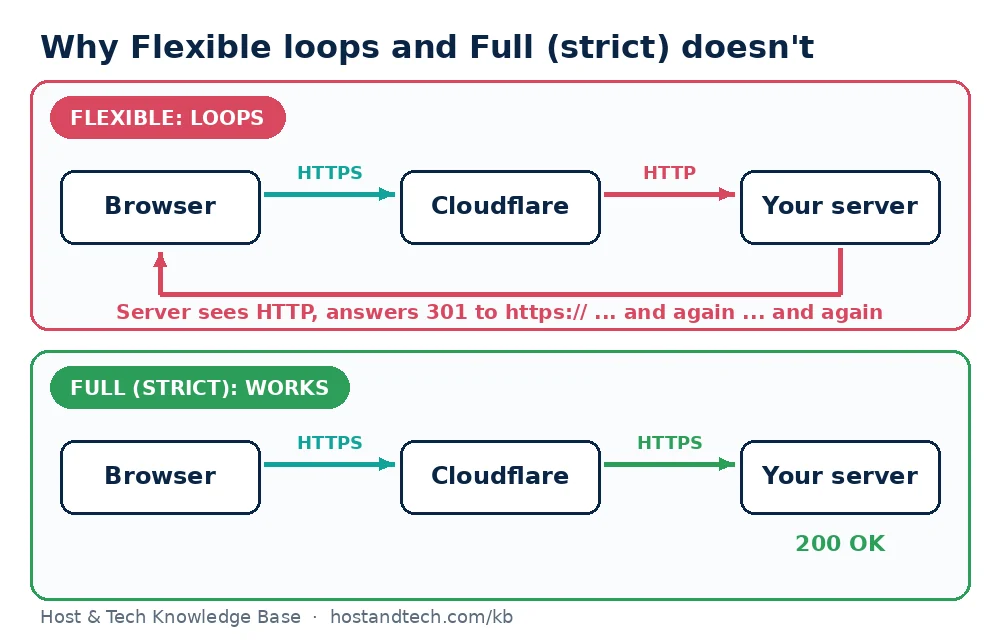
- Make sure the site has a valid certificate on the server itself. On cPanel, AutoSSL issues one for free (Security > SSL/TLS Status). On Plesk, follow installing a Let’s Encrypt certificate in Plesk.
- In the Cloudflare dashboard, open the domain, go to SSL/TLS > Overview and choose Full (strict).
- Wait a minute and run the curl trace again. You should see one 301 (or none) followed by
HTTP/2 200.
Note: if the page now shows Cloudflare error 526 (Invalid SSL certificate), the certificate on your server is missing, expired or doesn’t cover that hostname. Fix the certificate rather than going back to Flexible. Our guide to SSL certificates that won’t renew covers the usual AutoSSL and Let’s Encrypt failures.
Fix 3: Make WordPress use the same address as the server
WordPress redirects every request to the address stored in Settings > General (WordPress Address and Site Address). If those say http:// while your server or an SSL plugin forces HTTPS, the two keep sending visitors to each other.
If you can reach the dashboard, set both fields to your real https address and save. If the loop locks you out, set them in wp-config.php with the cPanel File Manager. Add these lines above the line that says “That’s all, stop editing”:
define( 'WP_HOME', 'https://example.com' );
define( 'WP_SITEURL', 'https://example.com' );
With SSH access, WP-CLI does the same and also shows what’s stored now:
cd ~/public_html
wp option get home
wp option update home 'https://example.com'
wp option update siteurl 'https://example.com'
Two more WordPress causes. First, SSL plugins (Really Simple SSL and similar) add their own redirect. If you can’t log in to turn one off, rename its folder in wp-content/plugins and the plugin is disabled. Second, if the site sits behind a proxy or load balancer that handles SSL for it, WordPress never sees HTTPS and keeps redirecting. Tell it to trust the proxy’s header by adding this to wp-config.php, above the same line:
if ( isset( $_SERVER['HTTP_X_FORWARDED_PROTO'] ) && $_SERVER['HTTP_X_FORWARDED_PROTO'] === 'https' ) {
    $_SERVER['HTTPS'] = 'on';
}
Warning: only add that block when a proxy you control sits in front of the site. On a server that takes traffic straight from the internet, anyone can send that header.
Fix 4: Remove the second www or HTTPS redirect
When www and non-www swap back and forth, two places each think they own the “preferred” address. These are the places a redirect can hide on our kind of hosting:
.htaccessin the site’s document root- cPanel Domains (the Force HTTPS Redirect switch) and cPanel Redirects
- Plesk Hosting Settings: the Preferred domain setting and the “Permanent SEO-safe 301 redirect from HTTP to HTTPS” box
- Plesk Apache & nginx Settings, under additional nginx directives
- The WordPress addresses from Fix 3, and any redirect or SEO plugin
- Cloudflare Redirect Rules and the “Always Use HTTPS” setting
The Plesk case catches people out regularly. Preferred domain is set to www.example.com, while WordPress stores https://example.com. Plesk adds www and WordPress strips it. Make them match, or set Preferred domain to None and let one layer decide.
On cPanel, I’d keep everything in one .htaccess block that sends visitors to HTTPS and non-www in a single hop, and switch the other options off:
RewriteEngine On
RewriteCond %{HTTPS} off [OR]
RewriteCond %{HTTP_HOST} ^www\. [NC]
RewriteRule ^ https://example.com%{REQUEST_URI} [L,R=301]
Put it above the WordPress block, and don’t use it behind Cloudflare Flexible: there, %{HTTPS} is always off, which brings back the loop from Fix 2. Rules for Nginx, IIS and the www version are in our guide to forcing an HTTP to HTTPS redirect.
How to prevent redirect loops
- Give each redirect one owner. Decide once where HTTPS is enforced (server or CDN) and where www is decided, and write it down. Most loops start when a second person or plugin adds a “helpful” redirect.
- Run the curl trace after every change to SSL, DNS, Cloudflare or WordPress addresses. A healthy site shows at most one 301 and then a 200.
- Set Cloudflare to Full (strict) before you turn the proxy on. Switching modes on a live site is how most of these loops begin.
- Fix mixed content separately. Padlock warnings after an HTTPS switch are a different problem with a different fix: see fixing mixed content warnings.
Googlebot hits the same loop as visitors, so pages can drop out of search while it lasts. Once the trace is clean, use URL Inspection in Search Console to request indexing for the home page. If you’d rather have HTTPS set up for you from day one, our cPanel shared hosting includes AutoSSL on every domain.
Frequently Asked Questions
What does ERR_TOO_MANY_REDIRECTS mean?
The browser followed a chain of redirects that never reached a real page, usually two rules sending it back and forth between the same two addresses. After about 20 hops it stops and shows the error. The fix is to find the two rules and remove one.
Why does Cloudflare cause too many redirects?
In Flexible mode Cloudflare connects to your server over plain HTTP. If your server redirects HTTP to HTTPS, it does that on every request and the loop never ends. Install a certificate on the server and set Cloudflare’s SSL/TLS mode to Full (strict).
Will clearing cookies fix ERR_TOO_MANY_REDIRECTS?
Only when the loop is caused by a stale cookie, which you can test by opening the site in a private window. If the private window loops too, the cause is a server, WordPress or Cloudflare setting and cookies won’t help.
How do I fix too many redirects in WordPress if I can’t log in?
Add WP_HOME and WP_SITEURL with your https address to wp-config.php using the cPanel File Manager or FTP. If an SSL or redirect plugin is involved, rename its folder in wp-content/plugins to disable it, then log in and tidy up.
Does a redirect loop hurt SEO?
Yes, while it lasts. Googlebot gets the same loop and can’t fetch the page, so it may drop from results. After fixing it, check the trace with curl and request indexing in Google Search Console.