
Overview
When a cPanel server is sending spam, the source is almost always one of three things: a mailbox whose password was stolen, a PHP script on one of the sites, or a forwarder passing inbound spam on to Gmail or Outlook. The Exim log tells you which in one or two commands. Stop the account sending first, then find the source, fix it, clear the queue and request delisting.
This guide is for VPS and dedicated server owners with root access to WHM. The usual warning signs are a mail queue in the thousands, bounce messages for mail nobody sent, a sudden Spamhaus or Microsoft block on your IP, or cPanel notices saying a domain “has exceeded the max emails per hour”. Work through the fixes in order. Clearing the queue before you’ve found the source just makes room for the next batch.
What causes a cPanel server to send spam
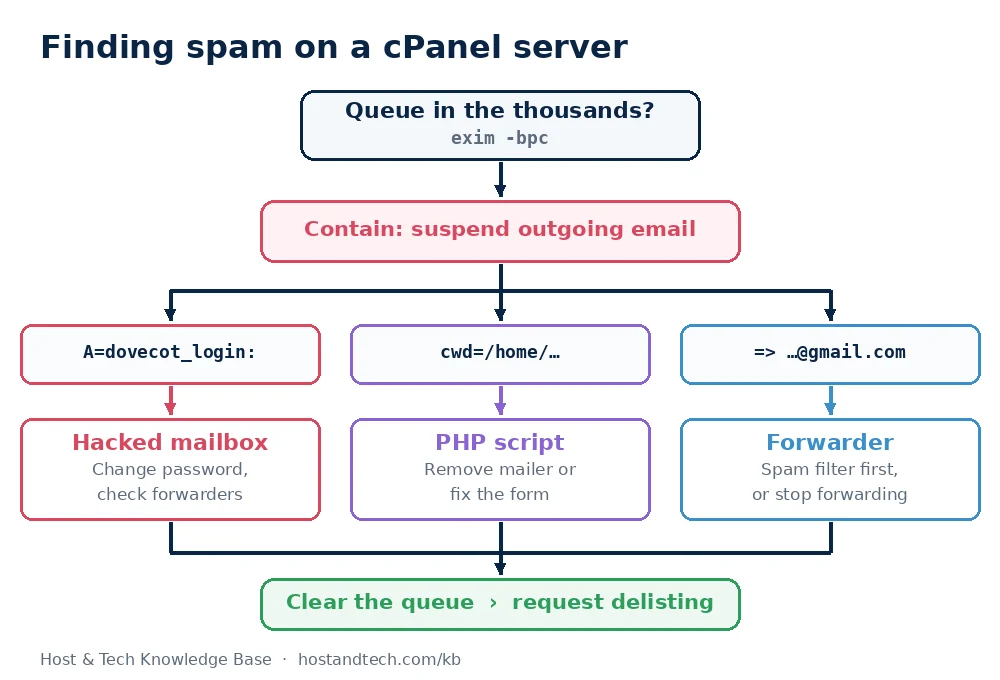
| Source | Sign in the Exim log | Typical cause |
|---|---|---|
| Compromised mailbox | A=dovecot_login:user@example.com on outgoing mail |
Weak or reused password, phished user, malware on a PC |
| PHP script | cwd=/home/user/public_html/... |
Abused contact form, or a mailer uploaded through an old plugin |
| Forwarder | Mail from outside senders relayed to Gmail or Outlook | A forwarder sending everything on, spam included |
How to find and stop the spam
Fix 1: Check the queue and stop the sending account
Count the queue, then see which domains it’s sending to and from:
exim -bpc
exim -bp | exiqsumm | sort -n | tail -n 15
A normal small server holds a handful of messages; thousands means something is sending right now. The same view is in WHM > Email > Mail Queue Manager. If one cPanel account clearly owns the spam, stop its outgoing mail while you investigate. Incoming mail and the website keep working:
whmapi1 suspend_outgoing_email user=cpuserReverse it later with whmapi1 unsuspend_outgoing_email user=cpuser. To stop just one address, use cPanel Email Accounts > Manage and set Sending Outgoing Email to Suspend (or Hold, which queues the messages so you can inspect them).
Fix 2: Find a compromised email account
Spam sent with a stolen password goes out through SMTP authentication, and Exim logs the mailbox that logged in. This counts outgoing messages by authenticated user:
grep -o 'A=dovecot_login:[^ ]*' /var/log/exim_mainlog | sort | uniq -c | sort -rn | headOne address with thousands of entries when everyone else has dozens is your answer. To confirm, list the IP addresses that logged in as that user:
grep 'A=dovecot_login:info@example.com' /var/log/exim_mainlog | grep -oE '\[[0-9.]+\]' | sort | uniq -c | sort -rn | headA spread of addresses in countries where nobody works for the company means a stolen password. To fix it:
- Change the mailbox password in cPanel and give the new one only to its owner.
- Check that mailbox’s forwarders, autoresponders and filters. Attackers sometimes add a forwarder to keep copies of the replies.
- Ask the owner to update the password on their devices and to scan their computer. A password stolen by malware gets stolen again.
Fix 3: Find a PHP script sending mail
Mail sent by a script has no SMTP login. Instead, Exim records the directory the script ran from. This lists the busiest ones:
grep 'cwd=/home' /var/log/exim_mainlog | grep -o 'cwd=[^ ]*' | sort | uniq -c | sort -rn | headA count in the thousands against /home/cpuser/public_html/wp-content/uploads/2024 or a folder you don’t recognise points at an uploaded mailer. A count against the site root usually means an abused contact form. To name the exact file, read the headers of one queued message:
exiqgrep -i -f cpuser@server.hostname.example | head -n 3
exim -Mvh 1tAbCd-000123-Xy
Replace the ID with one from the first command. With PHP’s mail.add_x_header enabled, the X-PHP-Originating-Script header names the script. Then:
- Uploaded mailer: remove it and scan the whole account, because it’s rarely the only file. See how to scan for malware in cPanel, then update or remove the plugin it came in through.
- Abused contact form: add a CAPTCHA or honeypot field, and make sure the form never puts the visitor’s input into the To, Cc or Bcc headers.
Fix 4: Stop forwarders relaying spam
A forwarder sends every inbound message on to another provider, spam included. Gmail and Outlook then see your server as the sender of that spam and rate its IP down. See which local addresses forward the most mail to Gmail (the address in angle brackets is the forwarder; swap in outlook.com or hotmail.com as needed):
grep '=> [^ ]*@gmail.com <' /var/log/exim_mainlog | grep -o '@gmail.com <[^>]*>' | sort | uniq -c | sort -rn | headThe fix is to filter before forwarding. In cPanel Email > Spam Filters, turn on spam filtering and auto-delete above a score of 5 to 7, so the worst spam is dropped before the forwarder sends it on. Better still, replace the forwarder with a mailbox the user checks from Gmail. Setting up email forwarding in cPanel covers the other forwarding pitfalls.
Fix 5: Clear the spam from the queue
Only once the source is fixed, remove the spam that’s still waiting. These delete by sender address and then remove frozen bounces:
exiqgrep -i -f info@example.com | xargs -r exim -Mrm
exiqgrep -z -i | xargs -r exim -Mrm
Warning: exim -Mrm deletes messages permanently. Run the exiqgrep part on its own first and check the count, so legitimate mail from the same sender isn’t swept up.
Fix 6: Request delisting
Look up your server IP at check.spamhaus.org and with the blocklists named in recent bounce messages. Request removal only after the queue is clean. Most lists delist quickly once the spam stops, and a second listing in a short time is slower to clear. Bounces for legitimate mail during this period are covered in handling email delivery failures in WHM.
How to prevent it
- Cap hourly sending. In WHM > Server Configuration > Tweak Settings, set “Max hourly emails per domain” to a number your customers never reach in normal use. A stolen password then sends hundreds of messages instead of tens of thousands before Exim refuses them.
- Stop password guessing. Keep cPHulk enabled in WHM, and add Fail2Ban on servers you manage without it.
- Keep sites patched. Old plugins with upload holes are where most script mailers come from.
- Publish SPF, DKIM and DMARC so forged mail using your domains is rejected elsewhere: see email authentication in WHM.
- Get alerted on queue size.
exim -bpcin a cron job that emails you when it passes a few hundred catches the next outbreak within hours.
For the customer-side view of the same problem, including what to tell a user whose mailbox was abused, see preventing email spam and blacklisting. If you’d rather not run a mail server at all, on our cPanel shared hosting the mail server is ours to look after.
Frequently Asked Questions
How do I check the mail queue on a cPanel server?
Run exim -bpc as root to count queued messages, and exim -bp piped to exiqsumm for a summary by domain. In the WHM interface, the same view is under Email, then Mail Queue Manager.
How do I stop a cPanel account from sending spam?
Run whmapi1 suspend_outgoing_email user=cpuser to stop all outgoing mail from that account while incoming mail keeps working. For a single mailbox, set Sending Outgoing Email to Suspend or Hold in cPanel Email Accounts.
How can I tell if an email account has been hacked?
Count outgoing messages per authenticated user in /var/log/exim_mainlog by searching for A=dovecot_login. A mailbox sending far more than the others, from IP addresses in unfamiliar countries, has a stolen password.
How do I find which PHP script is sending email?
Search the Exim main log for cwd=/home to see which directories send the most mail. Then read a queued message’s headers with exim -Mvh; the X-PHP-Originating-Script header names the file when mail.add_x_header is on.
Will clearing the mail queue get my IP removed from blacklists?
No. Blocklists delist your IP after the spam stops and you request removal. Clear the queue only after fixing the source, then submit the delisting request.