
Overview
To migrate email to a new host without losing messages, create the same mailboxes on the new server, copy the mail across over IMAP, switch your MX records, and then copy once more a day later to catch anything that arrived at the old server while DNS was changing. If both hosts run cPanel, a full account transfer moves the mailboxes for you and you can skip the copying steps.
This guide is for small business owners and the people who look after their email: moving from one hosting company to another, or from a server you’re shutting down. The plan below keeps every mailbox working throughout. Nobody has to stop sending email for a day, and mail that arrives during the switch still ends up in the new mailbox.
Prerequisites
- A list of every address on the domain and its password (or the ability to reset passwords on both sides).
- IMAP access to the old server. If people use POP3, read the note in Step 1 first.
- The new hosting account set up, with enough mailbox quota for the largest mailbox.
- Access to the domain’s DNS, wherever it’s hosted.
- For more than two or three mailboxes: a Linux machine or VPS with
imapsyncinstalled. For one or two, a desktop mail app such as Thunderbird is enough.
Step-by-step: migrate email to a new host
Step 1: List what you’re moving
Write down every mailbox and its size (cPanel Email > Email Accounts shows both), plus everything that isn’t a mailbox: forwarders, autoresponders, mailing lists and filters. IMAP copying moves messages and folders only. Forwarders and filters have to be recreated by hand on the new host, and they’re the part people forget until a customer’s email to sales@ goes nowhere.
Ask who uses POP3. A POP3 mail app usually downloads messages and deletes them from the server, so the mail lives on someone’s computer rather than on the old host. IMAP copying can’t reach it. Those users keep their mail where it is and point their app at the new server afterwards; IMAP vs POP3 explains how to move them to IMAP while you’re at it.
Step 2: Lower the MX record’s TTL a day ahead
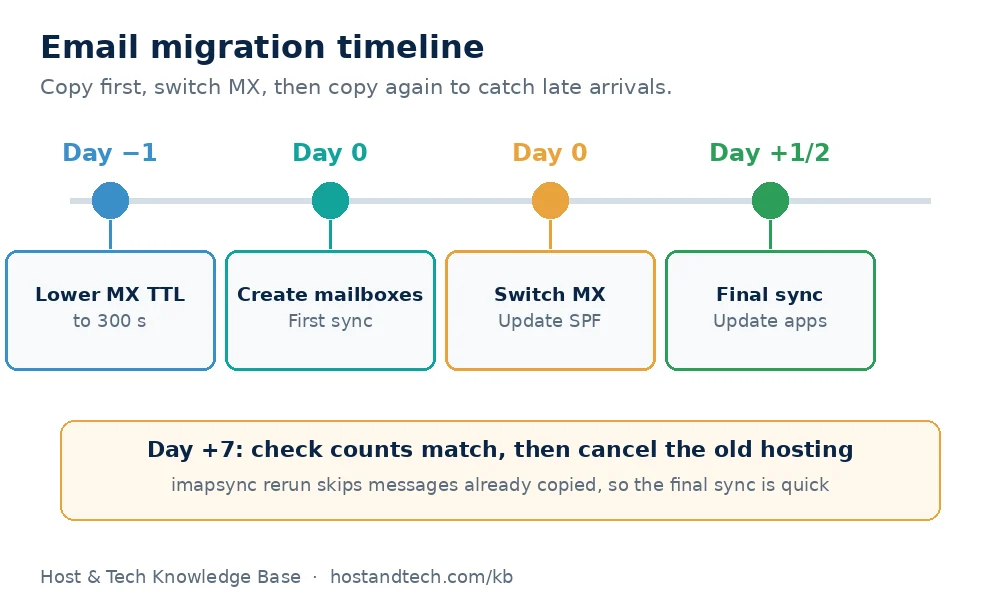
In the DNS zone, set the TTL on the MX record (and on mail.example.com) to 300 seconds. Do this at least one full old TTL before the switch, often 24 hours, so resolvers drop the cached value quickly when you change it. DNS propagation explained covers why this matters.
Step 3: Create the mailboxes on the new host
Create each address on the new server with the same name, a quota larger than its current size, and either the same password or a new one you’ll hand out. Don’t change MX yet. The new mailboxes stay empty and quiet until Step 5.
Step 4: Copy the mail (first sync)
Both hosts on cPanel: ask the new host to transfer the whole account, or restore a full backup from the old one. Mailboxes, folders and passwords come across together. The process is the same as in moving a cPanel account to a new server.
Any other combination: use imapsync. Until DNS changes, mail.example.com still points at the old server, so connect to the new one by its server hostname or IP address. Put each password in a file so it doesn’t end up in your shell history, and start with a dry run:
imapsync \
  --host1 mail.oldhost.example --user1 info@example.com --passfile1 ~/old.txt \
  --host2 server12.newhost.example --user2 info@example.com --passfile2 ~/new.txt \
  --ssl1 --ssl2 --automap --dry
The dry run lists the folders on each side and how they’ll map, without copying anything. --automap lines up the special folders (Sent, Drafts, Trash, Junk) even when the two servers name them differently. When the mapping looks right, run the same command without --dry. Large mailboxes take hours, so run it inside screen or tmux so a dropped SSH session doesn’t stop it.
For several mailboxes, put them in a file with one line per account (address;oldpassword;newpassword) and loop over it:
while IFS=';' read -r user p1 p2; do
  imapsync --host1 mail.oldhost.example --user1 "$user" --password1 "$p1" \
    --host2 server12.newhost.example --user2 "$user" --password2 "$p2" \
    --ssl1 --ssl2 --automap
done < accounts.csv
Delete the password files and the CSV when you’re finished.
One or two mailboxes, no server: add both accounts to Thunderbird as IMAP, select the messages in each old folder and drag them to the matching folder in the new account. It’s slow for big mailboxes but needs nothing installed. Pick one method per mailbox. Mixing a drag-and-drop with a later imapsync run is the usual way people end up with duplicates.
Step 5: Switch the MX records
Change the MX record to the new host’s mail server and update mail.example.com if you use it. Update the SPF record to allow the new server too, or mail you send will start landing in spam: see how to create an SPF record. If you’re moving the domain’s nameservers to the new host at the same time, check the MX and SPF records exist in the new zone before you switch.
Step 6: Run the sync again a day later
Some senders keep the old MX cached for a while, so a few messages still land on the old server after the switch. 24 to 48 hours later, run exactly the same imapsync command again. imapsync skips messages that already exist on the new server, so this second run copies only what’s new and finishes in minutes.
Step 7: Point everyone’s mail apps at the new server
Give users the new incoming and outgoing server names, ports and their passwords. Our cPanel email settings for Outlook, iPhone and Android guide has the exact screens. Keep the old hosting account for about a week as a safety net, then cancel it.
Verify nothing was lost
- At the end of each run, imapsync prints a summary.
Messages found in host1 not in host2 : 0 messagesis what you want to see. Any other number means a rerun or a look at the errors above it. - Compare the size of each mailbox on both servers. They won’t match to the byte, but they should be close.
- Check MX from outside:
dig +short MX example.comshould return the new server only. - Send a message from a Gmail or Outlook.com address and open its headers. The last “Received” line should show the new server.
Common Issues & Troubleshooting
NO [AUTHENTICATIONFAILED] Authentication failed
Cause: a wrong password, or a provider that no longer accepts plain IMAP passwords. Google Workspace and Microsoft 365 both block ordinary password logins for IMAP by default.
Fix: check the password by logging in to webmail on that server. For Google, create an app password (it needs 2-Step Verification on the account). For Microsoft 365, use an OAuth access token with imapsync’s --oauthaccesstoken1 option, or Microsoft’s own migration tools.
Sent and Trash end up as duplicate folders
Cause: the servers name special folders differently (for example INBOX.Sent and Sent Items) and the copy ran without folder mapping.
Fix: add --automap, check the mapping with --dry, then move any stray messages and delete the empty extra folders on the new server.
Mailbox is full on the new server
Cause: the new mailbox quota is smaller than the old mailbox.
Fix: raise the quota in Email Accounts > Manage and run imapsync again. It carries on where it stopped.
Mail still arrives at the old server days later
Cause: the old MX is still published somewhere, often because the domain’s nameservers still point at the old host, or a second MX record was left behind.
Fix: check dig +short NS example.com and dig +short MX example.com, remove any old MX record, and run the sync again. If mail goes missing after the move, cPanel email not receiving or sending walks through the checks.
Moving business email to Canadian servers? Every Host & Tech cPanel hosting plan includes email accounts on your own domain, with webmail and IMAP.
Frequently Asked Questions
Will I lose email when I change hosting providers?
Not if you copy the mailboxes before switching MX and run a second sync a day later. The second sync catches messages that reached the old server while DNS was updating, which is where mail usually goes missing.
How long does an email migration take?
The copy runs at roughly the speed of the slower server, often a few gigabytes an hour, so a large mailbox can take an evening. Plan two days end to end: one with lowered TTLs before the switch, and one after it for the final sync.
Can I migrate email from Gmail or Microsoft 365 to cPanel hosting?
Yes. imapsync works with both, but they don’t accept plain passwords over IMAP. Google needs an app password, and Microsoft 365 needs an OAuth token, after which the steps are the same.
Do forwarders and email filters move with the mailboxes?
No. IMAP copying moves messages and folders only. Recreate forwarders, autoresponders, mailing lists and filters on the new host by hand, unless both hosts run cPanel and you transfer the whole account.
What happens to POP3 email when I move hosts?
POP3 apps usually download and delete mail from the server, so those messages stay on the user’s computer and aren’t affected. Point the app at the new server afterwards, and consider switching it to IMAP so mail is kept on the server.