
Overview
A 502 Bad Gateway on a Plesk site means nginx, which answers every request first, couldn’t get a usable reply from the service behind it: PHP-FPM or Apache. The domain’s nginx log names the cause in one line, so start there: /var/www/vhosts/system/example.com/logs/proxy_error_log, or Websites & Domains > example.com > Logs in Plesk.
This guide is for VPS and dedicated server owners running Plesk Obsidian on Linux (AlmaLinux, Ubuntu or Debian) who see “502 Bad Gateway” with “nginx” underneath, on one site or on all of them. You’ll match the log line to its cause, apply the fix for that cause, and check that it holds under load. Restarting services clears most 502s for a few minutes; the log tells you whether they’ll be back tonight.
What causes 502 Bad Gateway in Plesk
With the default setup, nginx passes PHP requests either straight to a PHP-FPM pool for the domain or to Apache (listening on ports 7080 and 7081), which then calls PHP-FPM. A 502 means one of those links broke. The log line tells you which:
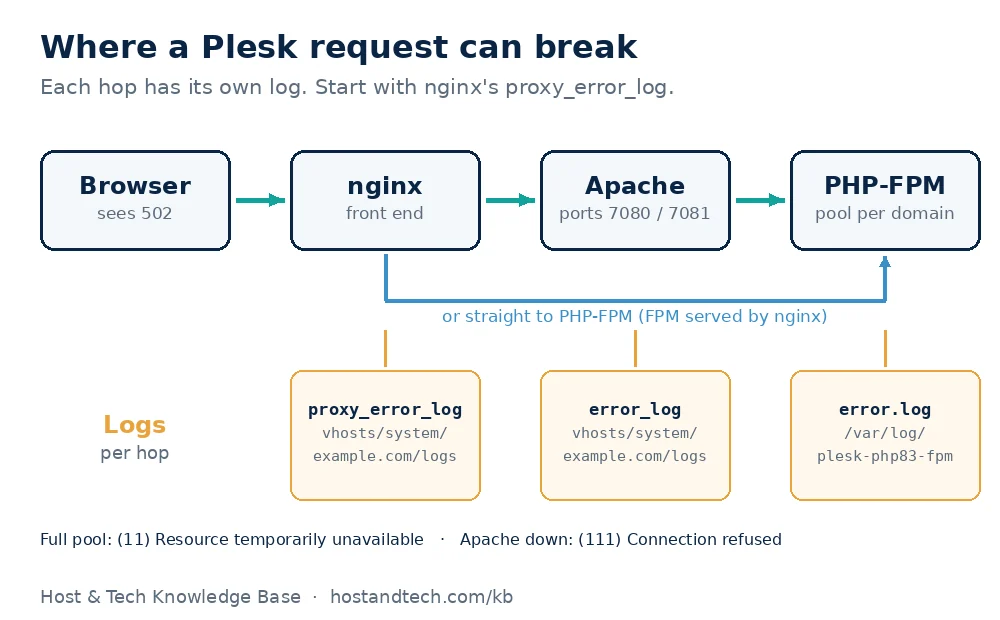
| Log line contains | What it means | Go to |
|---|---|---|
php-fpm.sock failed (11: Resource temporarily unavailable) |
The domain’s PHP pool is full | Fix 2 |
php-fpm.sock failed (2: No such file or directory) |
The pool isn’t running or its config is missing | Fix 3 |
(111: Connection refused) while connecting to upstream |
Apache is down | Fix 4 |
upstream prematurely closed connection |
PHP died while building the page | Fix 5 |
upstream sent too big header |
The response headers don’t fit nginx’s buffer | Fix 6 |
How to fix 502 Bad Gateway in Plesk
Fix 1: Read the domain’s proxy_error_log
Connect over SSH as root and read the last lines for the affected domain:
tail -n 50 /var/www/vhosts/system/example.com/logs/proxy_error_logIf every site on the server shows 502, check the server-wide log too:
tail -n 50 /var/log/nginx/error.logWithout SSH, open Websites & Domains > example.com > Logs and filter for nginx errors. Match the message to the table above. If the log is empty at the time of the error, reload the page once and look again; Plesk only writes the line when the request fails.
Fix 2: The PHP-FPM pool is full (max_children)
Each Plesk domain on PHP-FPM gets its own pool with a cap on how many PHP processes can run at once. When every process is busy, new requests are refused and nginx shows 502. Confirm it in that PHP version’s FPM log (replace 83 with the version the site uses):
grep max_children /var/log/plesk-php83-fpm/error.log | tail -n 5A line like WARNING: [pool example.com] server reached max_children setting (5), consider raising it confirms it. The default limit on many installs is low enough that one busy WooCommerce store hits it.
- In Plesk, go to Websites & Domains > example.com > PHP (PHP Settings).
- Under performance settings, raise pm.max_children. Doubling it is a reasonable first step.
- Click Apply. Plesk reloads the pool for you.
Before going higher, check the RAM. Each PHP process for a typical WordPress site uses 60 to 150 MB, and this prints the real average on your server:
ps -o rss= -C php-fpm | awk '{s+=$1; n++} END {printf "%d processes, %.0f MB average\n", n, s/n/1024}'Divide the RAM you can spare for PHP by that average to get a safe ceiling for all pools combined. Set it higher than the RAM allows and the kernel starts killing processes instead, which is harder to diagnose: see how to fix the Linux OOM killer. Often the better fix is fewer slow requests. Page caching and blocking bots on xmlrpc.php and wp-login.php cut the number of PHP processes a site needs.
Fix 3: The PHP-FPM socket is missing
“No such file or directory” means nginx looked for the pool’s socket and it wasn’t there. Usually the PHP-FPM service for that version has stopped, or the pool config wasn’t written after a PHP version change. List the handlers and restart the one the site uses:
plesk bin php_handler --list | grep fpm
systemctl restart plesk-php83-fpm
systemctl status plesk-php83-fpm --no-pager
If the socket still doesn’t appear, have Plesk rebuild the domain’s web configuration:
plesk repair web example.com -yA related case: a site switched from “FPM application served by Apache” to “FPM application served by nginx” in PHP settings can break plugins that expect Apache. If the 502 started right after that change, switch the handler back.
Fix 4: Apache isn’t running
“Connection refused” on port 7080 or 7081 means nginx tried to hand the request to Apache and nothing answered. Check the service (it’s apache2 on Ubuntu and Debian, httpd on AlmaLinux and Rocky):
systemctl status apache2 --no-pager
apachectl -t
systemctl start apache2
apachectl -t shows the config error that stops Apache from starting, usually from a manual edit or a half-applied update. If the error points to a Plesk-generated file, rebuild them all:
plesk repair web -yWarning: the server-wide repair regenerates the web configuration for every domain and restarts the web services, so every site blinks for a few seconds. Run it outside business hours if the server hosts customers. If nginx itself won’t start afterwards, see Plesk nginx failed to start.
Fix 5: PHP closes the connection mid-request
“upstream prematurely closed connection while reading response header” means PHP started on the request and then died: a fatal error, the memory limit or a crashed extension. The reason is in the domain’s error log, written at the same second:
grep -iE 'fatal|memory|segfault' /var/www/vhosts/system/example.com/logs/error_log | tail -n 10“Allowed memory size of … bytes exhausted” means raising memory_limit in the domain’s PHP settings, or finding the plugin that uses it. A segfault after a PHP upgrade usually means an extension (ionCube, an old opcache setting) that doesn’t match the new version. Uploads that fail on size show a different error; that one is covered in 413 Request Entity Too Large in Plesk.
Fix 6: upstream sent too big header
Some apps send large cookies or many headers (WordPress with several security or multilingual plugins is a regular case), and the reply doesn’t fit nginx’s default buffer. Raise it for the one domain in Websites & Domains > example.com > Apache & nginx Settings, under Additional nginx directives:
proxy_buffer_size 32k;
proxy_buffers 8 16k;
fastcgi_buffer_size 32k;
fastcgi_buffers 8 16k;
Click OK. Plesk tests the config before applying it and refuses to save directives nginx won’t accept, so a typo here can’t take the site down.
How to prevent it
- Read the logs weekly. Uptime monitors only see the outage. A quick look at
grep -c 'max_children' /var/log/plesk-php*-fpm/error.logshows a pool filling up weeks before visitors see a 502. - Size pools for RAM. Add up max_children across busy domains and compare it with free memory, especially after adding a site.
- Cache pages so most visits never touch PHP.
- Test after PHP and Plesk updates. Most socket and extension 502s appear in the hour after an upgrade. Our guide to updating Plesk on Linux includes a post-update check.
If a site still fills its pool after caching, the server is short of memory. Our SSD VPS plans let you add memory without moving the site.
Frequently Asked Questions
What does 502 Bad Gateway mean in Plesk?
nginx received the request but got no valid response from the service behind it, which is PHP-FPM or Apache. The domain’s proxy_error_log says which one failed and why, usually a full PHP pool, a stopped service or a PHP crash.
Where is the nginx error log for a domain in Plesk?
It’s at /var/www/vhosts/system/example.com/logs/proxy_error_log, with the server-wide log at /var/log/nginx/error.log. In the Plesk panel, open Websites & Domains, then the domain’s Logs page and filter for nginx errors.
Is a 502 error the same as a 504 Gateway Timeout?
No. A 502 means the backend refused or broke the connection, while a 504 means it was still working when nginx stopped waiting. A 504 points at slow scripts or timeouts; a 502 points at a full pool, a stopped service or a crash.
Should I turn off nginx proxy mode to fix a 502?
It usually just moves the error. Apache then returns 503 or times out for the same underlying reason, such as a full PHP-FPM pool. Fix the cause shown in proxy_error_log and keep nginx in front.
How high should I set pm.max_children in Plesk?
Measure the average PHP-FPM process size, then divide the RAM you can spare for PHP by that number to get a ceiling for all pools combined. Raising it beyond what the RAM allows trades 502 errors for out-of-memory crashes.