
Overview
NET::ERR_CERT_COMMON_NAME_INVALID means the SSL certificate the server sent is valid, but it doesn’t list the exact hostname you typed. The usual fix is to make the certificate cover that name: add the missing www or subdomain to it, or bind the right certificate to the site so the server stops sending a default one. Firefox shows the same problem as SSL_ERROR_BAD_CERT_DOMAIN.
This guide is for site owners on cPanel or Plesk hosting, and for visitors who want to know whether the fault is theirs. One openssl command tells you which name the certificate really covers, and the table below maps what you see to the fix. Expect ten minutes for most cases, plus a short wait while AutoSSL reissues the certificate.
What causes NET::ERR_CERT_COMMON_NAME_INVALID
Browsers compare the address you typed with the names in the certificate’s Subject Alternative Name (SAN) list. The old Common Name field is ignored by current browsers, so “common name” in the error is a leftover label. If the address isn’t in the SAN list, you get the warning, however valid and unexpired the certificate is.
| What you find | Likely cause | Go to |
|---|---|---|
Certificate lists example.com only |
No www in the certificate |
Fix 1 |
| Error only on a subdomain | Subdomain not covered | Fix 2 |
| Certificate is for another domain or the server hostname | Wrong certificate served | Fix 3 |
| Certificate is right but the domain points elsewhere | DNS or CDN mismatch | Fix 4 |
| Works for others, fails for you | Local device or address used | Fix 5 |
How to fix it
Fix 1: Add the missing www (or non-www) name
First see what the server sends. Run this from any Linux or macOS terminal, replacing example.com with the hostname that fails:
echo | openssl s_client -connect example.com:443 \
  -servername example.com 2>/dev/null \
  | openssl x509 -noout -subject -ext subjectAltName
If the DNS: list shows example.com but not www.example.com (or the reverse), that’s the fault. On cPanel:
- Open SSL/TLS Status in the Security section.
- Find the domain in the list. Names without a valid certificate are flagged, and the certificate details show which names it covers.
- Click Run AutoSSL. Wait a few minutes and reload the page.
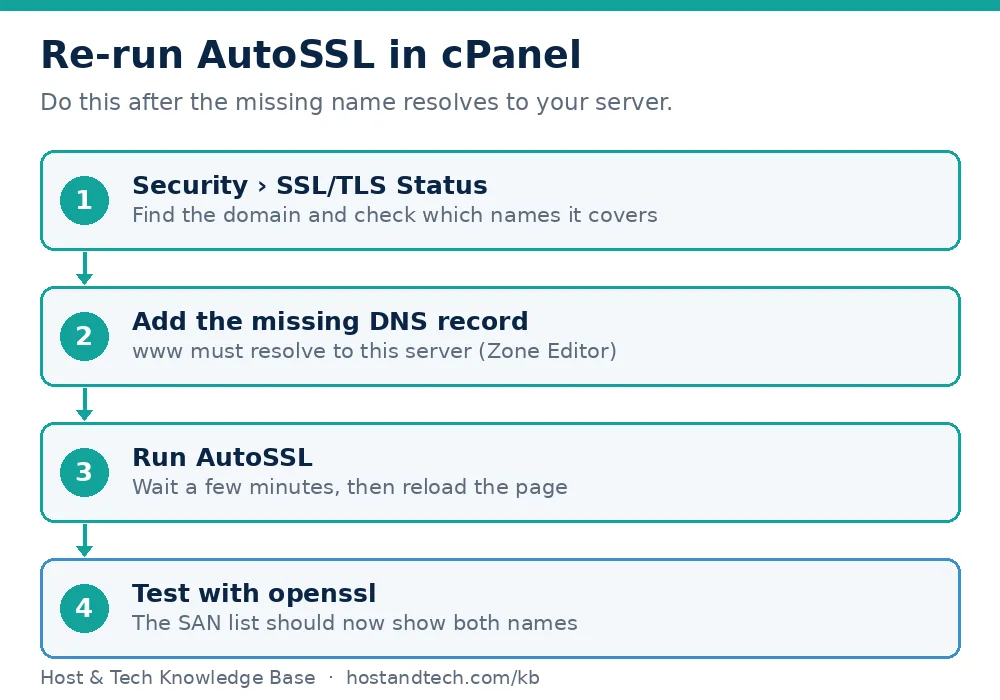
If www is still missing after AutoSSL, the cause is almost always DNS. AutoSSL only adds a name it can prove you control by fetching a file from it, so www.example.com must resolve to this server. Add the record in the Zone Editor (a CNAME for www pointing to example.com is enough), wait for it to resolve, then run AutoSSL again. This is the step most guides skip.
On Plesk, open the domain’s SSL/TLS Certificates, reissue the Let’s Encrypt certificate and tick the option to include the www subdomain. The Plesk SSL guide has the full steps.
Fix 2: Cover the subdomain
A certificate for example.com does not cover shop.example.com. On cPanel, create the subdomain first, then run AutoSSL so it appears in the SAN list. For many subdomains, a wildcard certificate covers *.example.com, but only one level deep: a.b.example.com is not covered. Wildcard certificates explained covers when that is worth buying.
Fix 3: Stop the server sending the wrong certificate
If the SAN list shows another domain or the server’s own hostname, the site has no certificate of its own and the server is falling back to a default. That happens after a domain is added without a certificate, after a migration, or when a certificate was installed for an old name. Install or re-run AutoSSL for the domain. On a server you manage, open WHM > SSL/TLS > Manage SSL Hosts, remove the stale entry, then re-run AutoSSL. If the certificate itself won’t issue, see WHM SSL installation failures and SSL certificate not renewing.
Fix 4: Check that the domain points at the right server
Your certificate can be perfect and the browser can still be talking to a different server: an old host, a parking page or a CDN that isn’t set up for this domain.
dig +short example.com
dig +short www.example.com
Compare the addresses with your server’s IP. If a CDN sits in front, its edge certificate must also list both names; check that inside the CDN’s dashboard. See domain not resolving if the records look wrong.
Fix 5: Rule out your own device and the address you used
- You typed an IP address. Certificates are issued to names, so
https://203.0.113.10always fails. Use the domain. - cPanel login on port 2083.
https://example.com:2083can show this error because the certificate on that port may belong to the server hostname. Usehttps://cpanel.example.comor the hostname in your welcome email. - Antivirus HTTPS scanning or a proxy. Test on mobile data or another device. If it only fails on one machine, the local software is replacing the certificate. Related: ERR_SSL_PROTOCOL_ERROR.
- Very old devices without SNI. They get the server’s default certificate. Only a dedicated IP fixes that, and most sites don’t need to support them.
How to prevent it
- Create the
wwwDNS record on the same day you add a domain, so AutoSSL includes it from the start. - After any migration, run the
opensslcommand above for both the bare domain andwww. - Redirect one version to the other once both have working certificates. Force HTTPS shows how, and mixed content is the next thing to check.
If the certificate still won’t cover your names after these checks, open a ticket through our help centre with the domain and the output of the openssl command, or look at cPanel hosting with AutoSSL if your current host doesn’t offer it.
Frequently Asked Questions
What does ERR_CERT_COMMON_NAME_INVALID mean?
The certificate the server presented is valid but doesn’t include the hostname you visited in its Subject Alternative Name list. The browser refuses the connection because it can’t confirm the certificate was issued for that site.
Why does my site work on www but not without it?
The certificate was issued for only one of the two names, or one name doesn’t point to your server so AutoSSL couldn’t validate it. Add the missing DNS record, then run AutoSSL again so both names are on the certificate.
Is ERR_CERT_COMMON_NAME_INVALID a problem on my computer or on the website?
Test on another device or on mobile data. If the error disappears, it’s local, often antivirus HTTPS scanning or a proxy. If it appears everywhere, the certificate or its binding on the server is wrong.
Does a wildcard certificate fix it?
It fixes subdomain errors, since *.example.com covers shop.example.com and mail.example.com. It doesn’t cover the bare domain unless that name is added, and it doesn’t cover deeper levels such as a.b.example.com.
Can I click through the warning safely?
Not on a site you don’t control, because a name mismatch is also how interception attacks look. On your own site, fix the certificate instead so visitors never see the warning.