
Overview
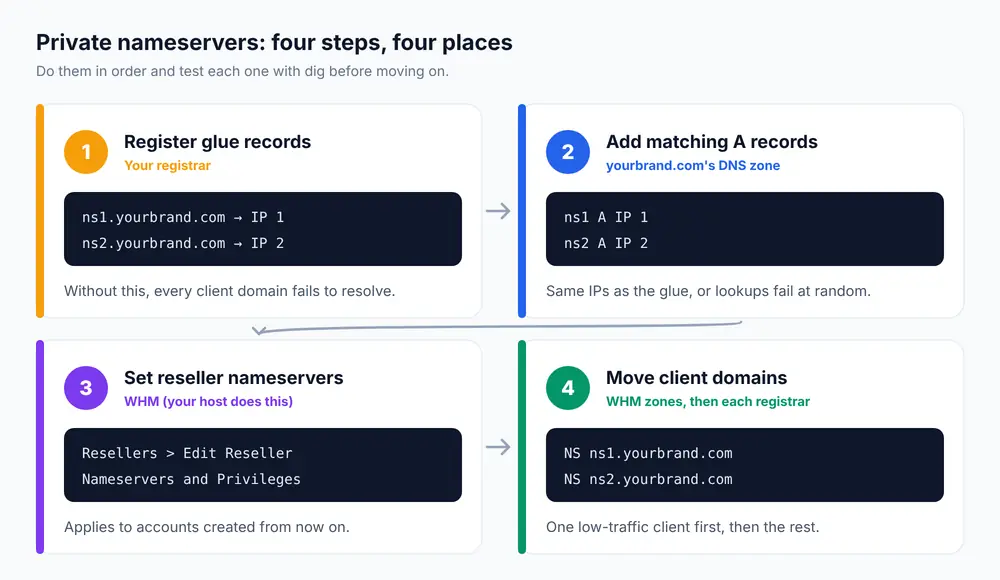
Private nameservers let your hosting clients point their domains at ns1.yourbrand.com and ns2.yourbrand.com instead of your provider’s nameservers, so your brand is the only one they see. Setting them up takes four things: register the two hostnames as glue records at the registrar of yourbrand.com, add matching A records in its DNS zone, have them set as your reseller account’s default nameservers in WHM, and update any accounts that already exist.
This guide is for cPanel reseller hosting customers and for anyone running their own WHM server who wants white-label DNS. It explains why the glue record step can’t be skipped, the order to do things in so nothing breaks, and how to prove each part works with dig before you give the names to a single client.
Prerequisites
- A domain for your brand, such as
yourbrand.com, that you control at its registrar. - A reseller hosting account (or root WHM access on your own server).
- Two IP addresses for the nameservers. On reseller hosting your provider gives you these; they are the IPs of the DNS servers that actually hold your clients’ zones. Don’t invent them or use your website’s IP unless your host confirms it.
Why the glue record matters
When someone looks up clientsite.com and it’s delegated to ns1.yourbrand.com, their resolver first has to find the IP of ns1.yourbrand.com. But that name lives inside yourbrand.com, whose nameservers are… ns1.yourbrand.com. That loop is broken by a glue record: the IP of your nameserver, stored at the registry for .com (or .ca) itself. Without it, lookups for every client domain fail. An A record in your own zone alone is not enough.
Step 1: Register the nameservers at your registrar
Log in where yourbrand.com is registered and find the section for creating nameserver hostnames. Registrars name it differently: Register Nameservers, Child Nameservers, Host Records, Glue Records or Private Nameservers. In a WHMCS client area it’s under Domains > Manage Domain > Private Nameservers.
Create two entries:
| Nameserver | IP address |
|---|---|
ns1.yourbrand.com |
first IP from your host |
ns2.yourbrand.com |
second IP from your host |
Some registries insist the two nameservers use different IP addresses, and two different IPs on two different servers is what gives you real redundancy anyway. This step only registers the names; it doesn’t change the nameservers your brand domain uses.
Step 2: Add A records in your brand domain’s zone
The glue lives at the registry, but your own zone must answer for the same names with the same IPs. In cPanel for the account that owns yourbrand.com, open Domains > Zone Editor > Manage and add:
ns1.yourbrand.com.   14400   IN   A   203.0.113.10
ns2.yourbrand.com.   14400   IN   A   203.0.113.11
Use your real IPs in place of the 203.0.113.x examples. If the IPs in the zone and the glue don’t match, some resolvers will use one and some the other, which causes intermittent failures that are miserable to debug.
Step 3: Make them your default nameservers in WHM
New cPanel accounts get their nameservers from the reseller’s settings. On reseller hosting, ask your provider to set them, because resellers can’t change this themselves. On Host & Tech reseller plans, open a ticket with the two hostnames and we’ll set them.
With root access on your own WHM server, set them yourself:
- Go to Resellers > Edit Reseller Nameservers and Privileges.
- Select the reseller and click Submit.
- Under Nameservers, choose Explicitly Set the Nameservers and enter
ns1.yourbrand.comandns2.yourbrand.com. - Click Save All Settings.
For a server you use only for your own brand, the server-wide defaults are in Server Configuration > Basic WebHost Manager Setup > Nameservers. Either way, the setting applies to accounts created from now on.
Step 4: Update existing accounts and client domains
Accounts created before Step 3 still carry the old NS records in their zones. For each one, open DNS Functions > Edit DNS Zone in WHM, select the domain and change the two NS records to your new names. Then the domain owner (you or your client) changes the domain’s nameservers at its registrar to ns1.yourbrand.com and ns2.yourbrand.com. Our guide on changing nameservers without breaking email covers that switch, and it’s worth sending to clients.
Change one low-traffic client first, confirm it resolves, then do the rest.
Step 5: Verify it works
1. The glue is at the registry. Ask a .com registry server directly and look at the ADDITIONAL section:
dig +norec @a.gtld-servers.net yourbrand.com NSFor .ca domains, use a CIRA server instead: dig +norec @any.ca-servers.ca yourbrand.ca NS. Glue only appears there once yourbrand.com itself uses the new names, so before that, check the registrar’s control panel shows both hosts with the right IPs.
2. Your names resolve to the right IPs:
dig +short ns1.yourbrand.com A
dig +short ns2.yourbrand.com A
3. Each nameserver answers for a client domain (this proves the server really holds the zone):
dig +short @ns1.yourbrand.com clientsite.com A
dig +short @ns2.yourbrand.com clientsite.com A
Both must return the site’s IP. If one returns nothing, that server doesn’t have the zone, and clients will see random failures until it does.
Troubleshooting
Registrar says “Invalid nameserver” or “Nameserver not registered” when a client switches
Step 1 is missing or not finished. The hostnames must exist as registered hosts at the registry before any domain can be delegated to them. Check the spelling in your registrar’s host list, and give it a few minutes after creating them.
Client site works for some visitors and not others
Usually one of the two nameservers doesn’t answer for the zone, or the glue IP and the zone’s A record disagree. Run the three checks in Step 5 against both ns1 and ns2. Also remember resolvers cache the old delegation for up to 48 hours, so mixed results right after a change can be normal; see diagnosing DNS issues.
New accounts still get the provider’s nameservers
The reseller nameservers weren’t saved in WHM, or the account was created from a package or tool that sets its own. Recheck Edit Reseller Nameservers and Privileges, and if you create accounts through WHMCS, update the nameserver fields on the server entry under Configuration > System Settings > Servers too. The WHMCS reseller setup guide shows where.
Does ns2 need to be on a different server?
For real redundancy, yes. Two names pointing at one machine look professional but go down together. Most reseller plans serve DNS from the provider’s DNS cluster behind both names; if you run your own server, a WHM DNS cluster (Clusters > DNS Cluster) is the way to add a second machine.
White-label nameservers are included with our cPanel reseller hosting. For the wider business setup, see how to start a reseller hosting business and managing multiple clients in WHM.
Frequently Asked Questions
What are private nameservers?
They are nameservers named after your own domain, such as ns1.yourbrand.com, that point to your host’s DNS servers. Clients see your brand instead of your provider’s, which is the basis of white-label reseller hosting.
What is a glue record?
A glue record stores the IP address of a nameserver at the domain registry itself. It is required when the nameserver’s name is inside the domain it serves, such as ns1.yourbrand.com for yourbrand.com, otherwise resolvers cannot find it.
Do private nameservers need two different IP addresses?
Some registries require it, and two IPs on separate servers is what makes DNS redundant. Use the IPs your host gives you rather than choosing your own.
How long do private nameservers take to work?
The glue records usually appear at the registry within minutes, but resolvers can cache the old delegation for a domain for up to 48 hours. Test with dig against the nameservers directly to confirm the setup before waiting on caches.
Will changing to private nameservers cause downtime?
Not if the new nameservers already hold identical zones. Set up and verify ns1 and ns2 first, then switch one client domain at a time at its registrar.